01 — See it work
What your team sees in HubSpot
-
 1
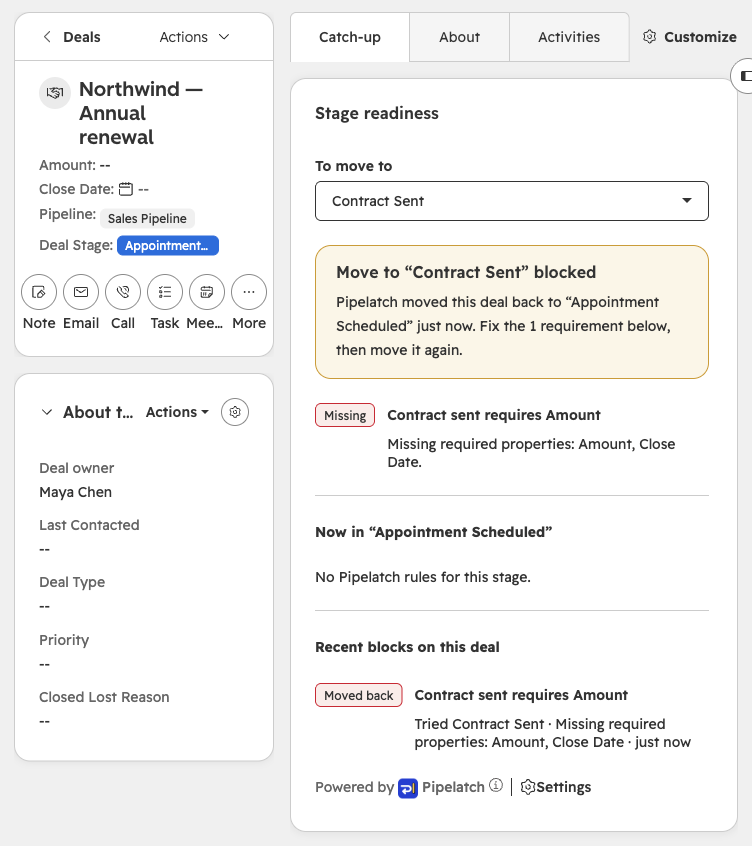
A rep moves a deal too early
Maya drags Northwind to Contract Sent with no amount and no close date. Pipelatch moves it back in seconds. The card on the deal says exactly what is missing.
-
 2
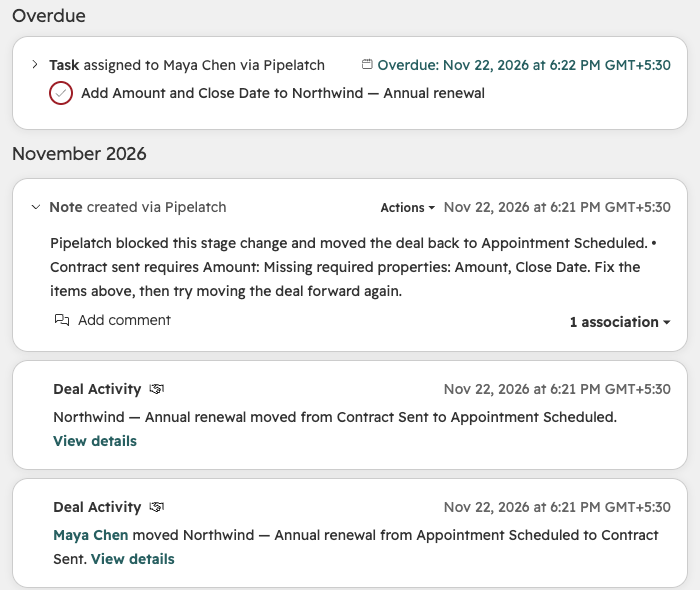
The fix is on the timeline
A note explains the block, and the deal owner gets a task to add the missing fields. HubSpot reminds them like any other task.
-
 3
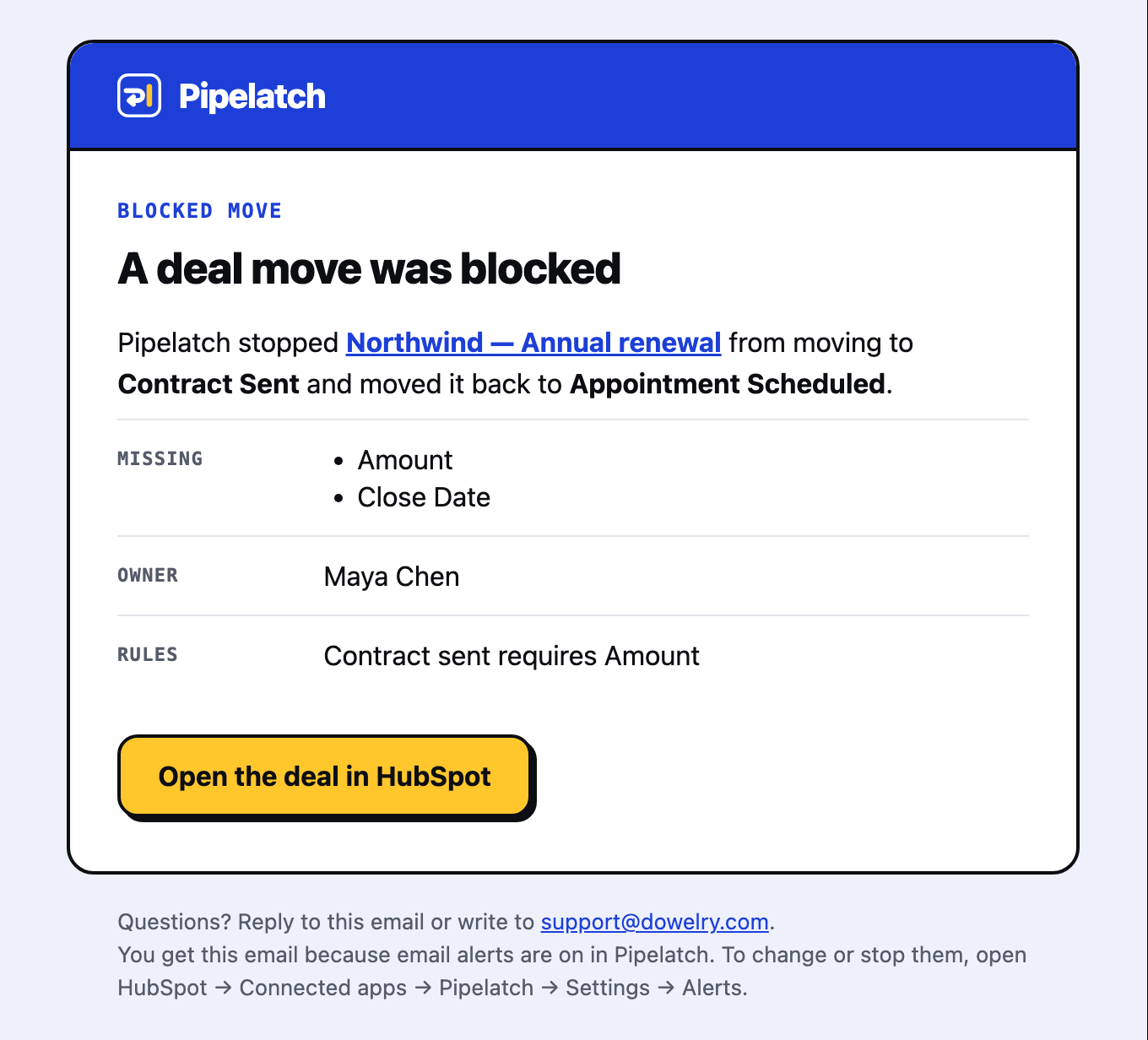
You hear about it
Get an email for each blocked move, or one summary a day. Prefer Slack? Pipelatch can post to a channel instead.
-
 4
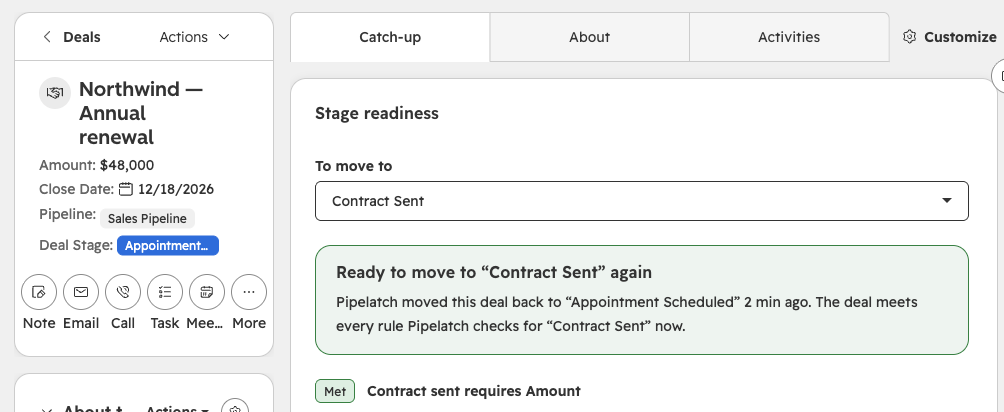
Fixed, and on its way
Maya adds the amount and the close date. The card turns green, and the next move goes through. Clean data, no chasing.
-
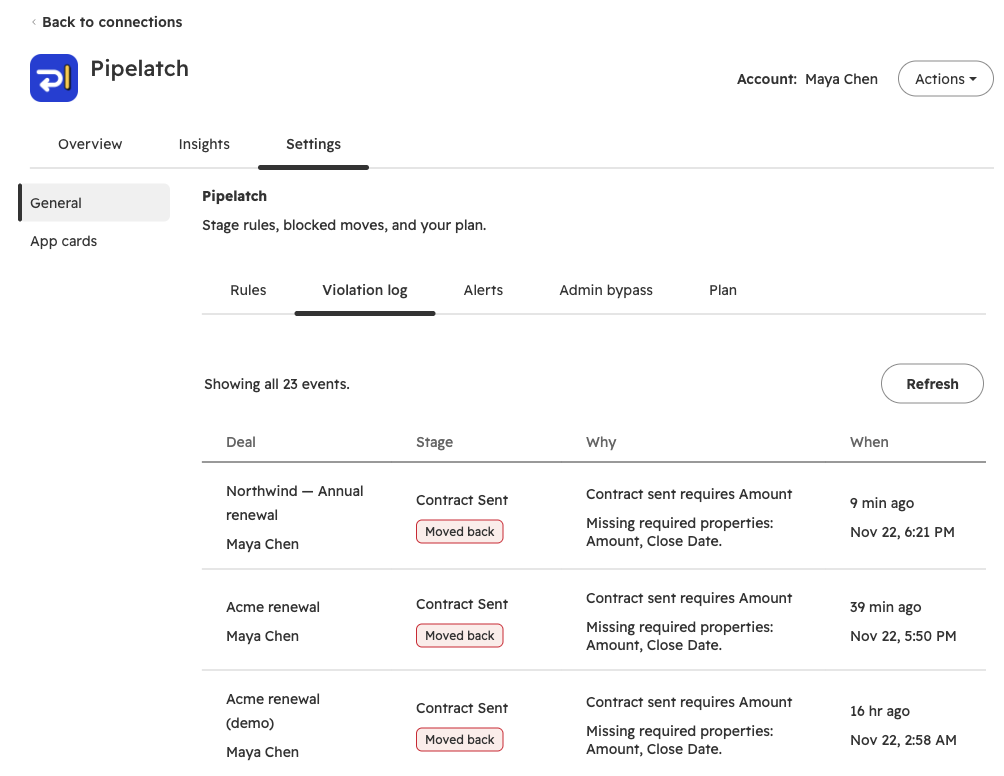 5
Every block, in one log
See which deals were stopped, why, and when. Spot the stages where your team skips steps, and fix the process, not just the deal.
02 — How it works
Set it up in three steps
-
01
Install it
Click Install on HubSpot and approve the permissions. It takes a minute, and every install starts with a 14-day Pro trial.
-
02
Set your rules
In HubSpot, open Pipelatch from Connected apps. Pick a pipeline and stage, then say what must be true before a deal can enter it.
-
03
Reps work as usual
When a deal skips what it needs, Pipelatch moves it back, adds a note, and gives the owner a task. Every block is logged.
03 — What you can require
Rules for every stage
-
Required properties
Block a stage change until chosen deal fields, such as amount or a custom property, are filled in.
-
Contact or company
Require an associated contact, company, or both before a deal can move on.
-
Line items
Make sure a deal has line items before it enters a later stage.
-
A real close date
Stop a move when the close date is missing or already in the past.
-
Conditional fields
Ask for a field only when another one meets a condition, like a discount reason on a large deal.
-
A deal card and a log
Reps see what is missing right on the deal. Admins see every blocked move, and can get an email or a daily summary.
04 — Plans
Start free. Upgrade when it pays off.
Every install gets all of Pro for 14 days, once per HubSpot account. No card. Billing is handled by Polar.
-
Free
$0 forever
- 1 rule in 1 pipeline
- Moves the deal back, with a note and a task
- Violation log for the last 7 days
-
Starter
$29 a month, or $290 a year
- Up to 10 rules in 1 pipeline
- Email alerts: every block, or a daily summary
- Full violation log
-
Pro
$79 a month, or $790 a year
- Unlimited rules in every pipeline
- Conditional rules and an admin bypass list
- Slack and email alerts, full log
Move to a smaller plan and nothing is deleted: extra rules pause, and the oldest keep running. Full refund within 14 days of your first payment.
05 — Questions
Questions, answered
Still stuck? Email support@dowelry.com. A real person replies.
How do I install Pipelatch?
Click Install on HubSpot at the top of this page. HubSpot asks you to pick an account and approve the permissions the app needs. Then open Pipelatch from Connected apps in that account and add your first rule.
What does it cost?
Every install starts with a 14-day Pro trial. No card needed. After that you can stay on Free (1 rule in 1 pipeline), or choose Starter ($29 a month or $290 a year: up to 10 rules in 1 pipeline, and email alerts) or Pro ($79 a month or $790 a year: unlimited rules in every pipeline, conditional rules, admin bypass, and Slack and email alerts).
How do I change or cancel my plan?
In HubSpot, open Pipelatch settings and go to the Plan tab. Payments are handled by Polar, our merchant of record. Use Manage billing there to change your card, get invoices, or cancel. If you cancel, you keep your plan until the end of the period you paid for, then move to Free. Not happy? Email us within 14 days of your first payment for a full refund.
What happens when a deal is blocked?
The deal moves back to the stage it came from. Pipelatch adds a note that says which rule failed and what was missing, and the deal owner gets a task to fix it (you can turn tasks off). The block is saved in the violation log and shows on the deal card. On Starter and Pro, admins can also get an email for every block or a daily summary.
What happens when my trial ends, or I move to a smaller plan?
Nothing is deleted. Your oldest rules keep running up to the new plan's limit, and the rest are paused. The settings page and the deal card show which rules are paused and why. Upgrade any time and they run again.
What access does the app need?
It reads deals, pipelines and properties, line items, owners, and whether a deal has contacts or companies. It writes to a deal only to move the stage back and to add a note or task. The full list is in the privacy policy.
How do I delete my data?
Uninstall Pipelatch from HubSpot. That deletes your account and the rules and logs we store. You can also email support@dowelry.com and ask us to delete it.
Something isn't working. What should I send?
Your HubSpot portal ID, the deal ID if one deal is involved, the rule you expected to apply, and what you saw instead. Screenshots help.